Home
Products 🤖
Skora AI AI Grading
Teach Smart AI Co-teacher on your books
🎓
Education ERP School & college platform
👥
HRMS & Payroll People · payroll · compliance
Partners Pricing Blog Demo Contact
Talk to sales Book a demo
01 — Lesson Plans

A lesson plan from a chapter — in three minutes.

Pick a chapter from your indexed textbook. Tell Teach Smart your duration, board, class, and learning style. Get a 5E lesson plan back — Engage, Explore, Explain, Elaborate, Evaluate — with timing, suggested activities, and visual aids.

🌱 Photosynthesis — Autotrophic Nutrition

TS-SSC Class 10 | Biological Sciences | Chapter 1
Light: 60% Chlorophyll CO₂: 50% H₂O: 70% O₂ Released Glucose
60%
50%
70%
Rate
50%
Glucose
40
O₂ Released
45
Limiting
CO₂
Van Niel's Equation
CO₂ + 2H₂O + Light → [CH₂O] + H₂O + O₂

A real interactive visual generated by Teach Smart AI · Class 10 Biology · Chapter 1

Gist · Cheat sheet

The 1-minute chapter brief.

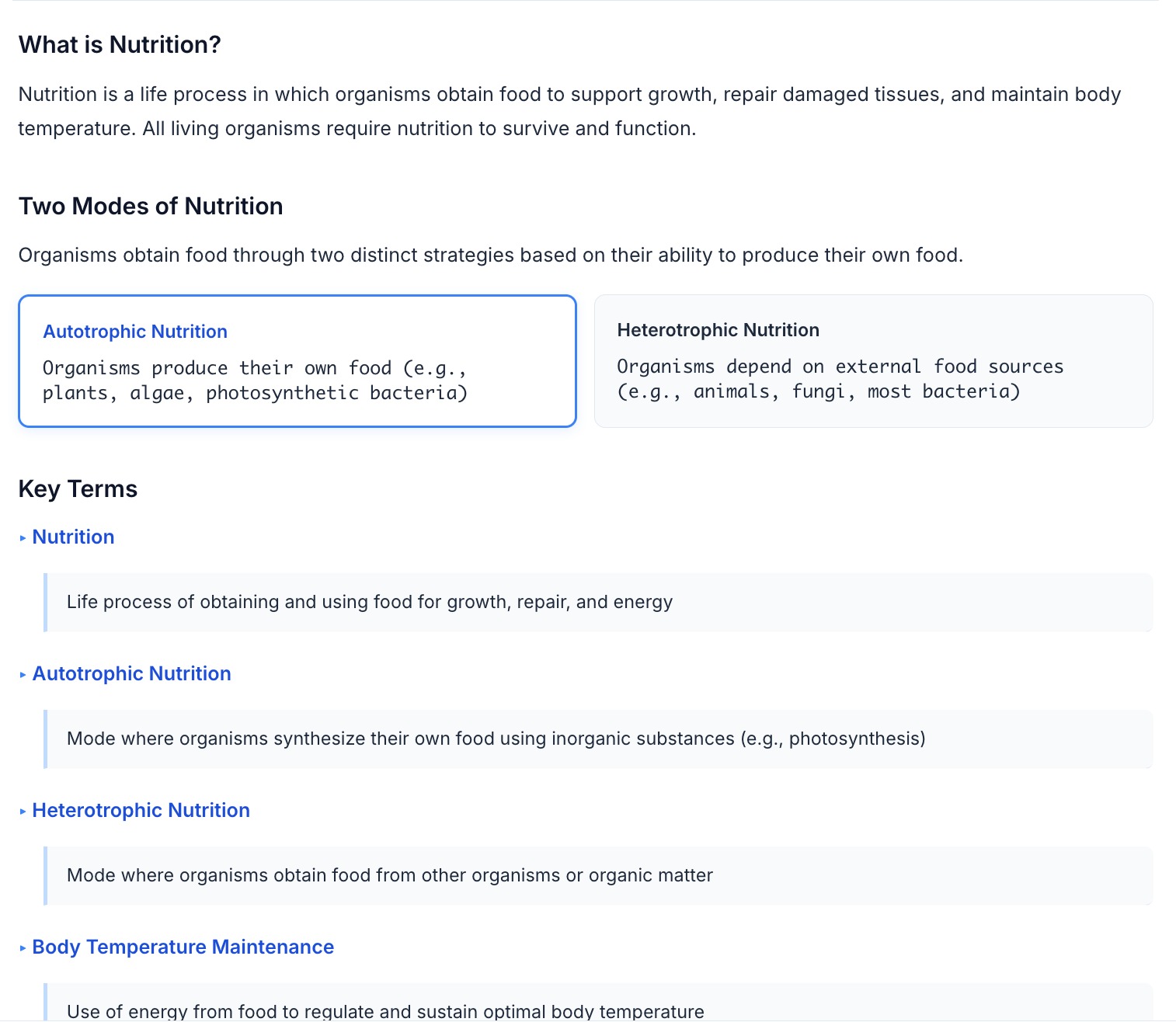
Before walking into class, a teacher needs to know what they're walking into. The Gist is a one-page scannable summary of the chapter — concepts, key terms, common misconceptions — designed to read in 60 seconds.

  • Concept summary in plain English — no jargon, no padding
  • Key terms with one-line definitions
  • Common student misconceptions flagged up front
  • One page, no scrolling — print or open on a phone
  • Auto-regenerated when the textbook content updates
Gist — one-page chapter brief with concepts, key terms, and common misconceptions
Teaching Notes · How to explain

The voice of an experienced teacher, on demand.

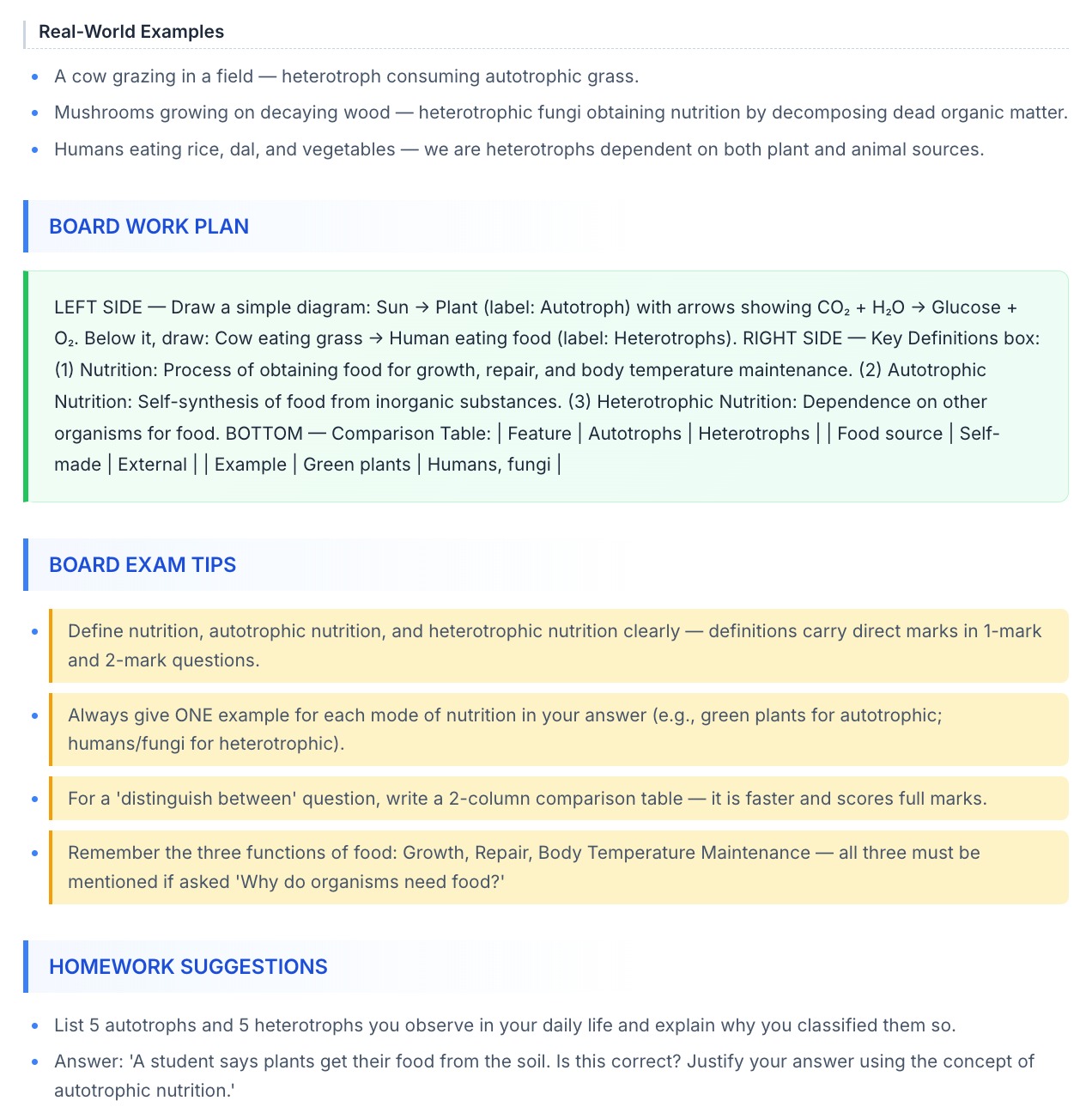
Lesson plans tell you what to teach. Teaching Notes tell you how. Misconceptions to address, analogies that land, real-world examples, and where students typically get stuck — written from a pedagogy lens, not an LLM lens.

  • Misconceptions to surface and correct, in the order they tend to arise
  • Analogies that work for the specific class and age group
  • Worked-out examples with student-facing reasoning
  • "If a student asks this…" — anticipated-question prompts
  • Stage-by-stage tips a senior teacher would share off the record
Teaching Notes — misconceptions, analogies, and anticipated student questions for the chapter
Homework · Activities, not just questions

Indian-school homework — the way real teachers actually set it.

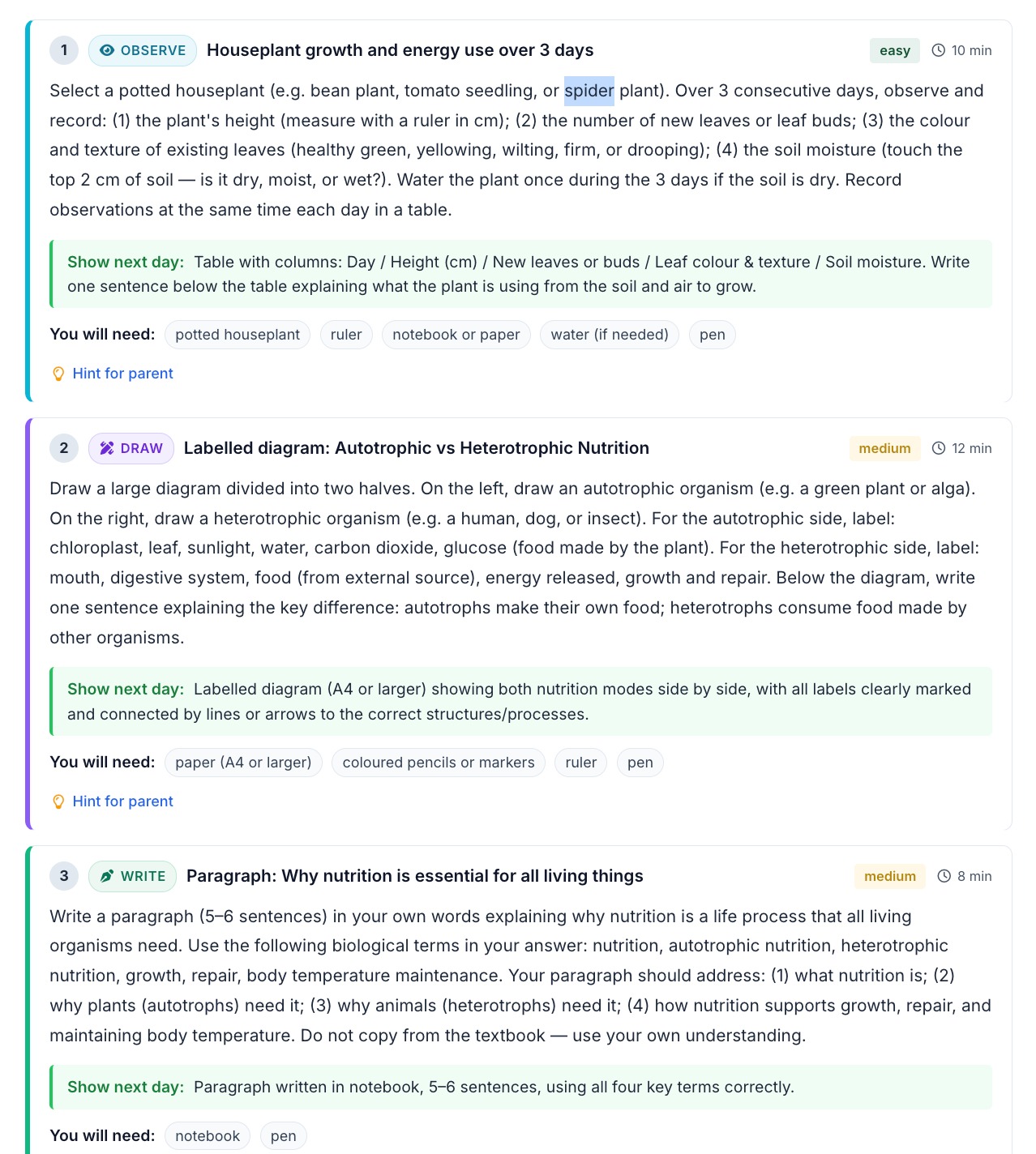
Homework isn't a clone of the day's worksheet. It's a mix of activities — read for 20 minutes, interview a family member, run a sink-or-float experiment, label a map, record a short video, build a board game. Teach Smart generates activity-shaped tasks that match the chapter, not just another question list.

  • Task vocabulary: read · write · draw · observe · build · discuss · research · practice
  • Activities tied to the chapter and pitched at the class level
  • Printable PDF for kids without a device; push to student app for kids with one
  • Parent receives a notification when homework is assigned and when it's due
  • Submission proof — photo, video, or a checked-off activity — flows back into the parent app
Homework artefact — mixed activities (read, observe, build, discuss) with due date and parent-notification panel
Frequently asked

Lesson plan questions teachers ask first.

Why 5E specifically — can I generate plans in another format?
5E is the default because it's the framework most teacher-training programmes in India and the IB world already use — Engage, Explore, Explain, Elaborate, Evaluate. The structure is configurable per school during onboarding, so a campus that prefers a 7E variant, a Madeline Hunter 7-step format, or a board-specific lesson template can switch the default. Individual teachers can also override format per plan.
How long does generation actually take?
A single-period 5E plan from a chapter that's already indexed takes around three minutes end-to-end — most of which is the LLM writing speaker-quality activity descriptions. The first generation for a new chapter takes a little longer because the textbook is indexed once and then cached; subsequent plans for that chapter are faster and incur no re-indexing cost.
What inputs does a teacher need to provide?
Four things — the chapter (picked from your indexed library), the class and board, the period duration, and an optional learning-style hint (visual, hands-on, discussion-led). Everything else — objectives, pacing, activities, assessment items — comes from the chapter content and the 5E structure. There are no prompts to memorise.
How is the plan grounded — and what happens when the textbook is silent on something?
The plan is generated from your indexed chapter content first, your additional materials second, your workbook third. When the 5E structure asks for content the textbook doesn't cover — a hook activity, for instance — the plan falls back to a pedagogically generic suggestion clearly tagged so teachers know it's not from the book. Inline source citations on individual paragraphs are a Textbook Chat feature, not the lesson-plan artefact itself.
Can the plan push directly into our timetable or topic tracker?
Yes — for schools running the Digiclove Education ERP, a finalised plan lands as a topic-track card against the right class, subject, and date in one click, including the linked assessment from the Evaluate stage. For other LMS environments, the plan exports to PDF, Word, or Google Docs and can be shared via the roster-sync connector.

Send us a chapter. Get a sample lesson plan back.

Pick any chapter from any class textbook. We'll index it and generate a 5E lesson plan for free.

Send a chapter Back to overview