Home
Products ๐Ÿค–
Skora AI AI Grading
โœจ
Teach Smart AI Co-teacher on your books
๐ŸŽ“
Education ERP School & college platform
๐Ÿ‘ฅ
HRMS & Payroll People ยท payroll ยท compliance
Partners Pricing Blog Demo Contact
Talk to sales Book a demo
04 โ€” Textbook Chat

Ask the textbook a question. Get the answer with citations.

A chat assistant that knows your textbook. Every answer comes back with chapter, page, and paragraph references from your indexed content โ€” never invented sources, never confidently-wrong claims.

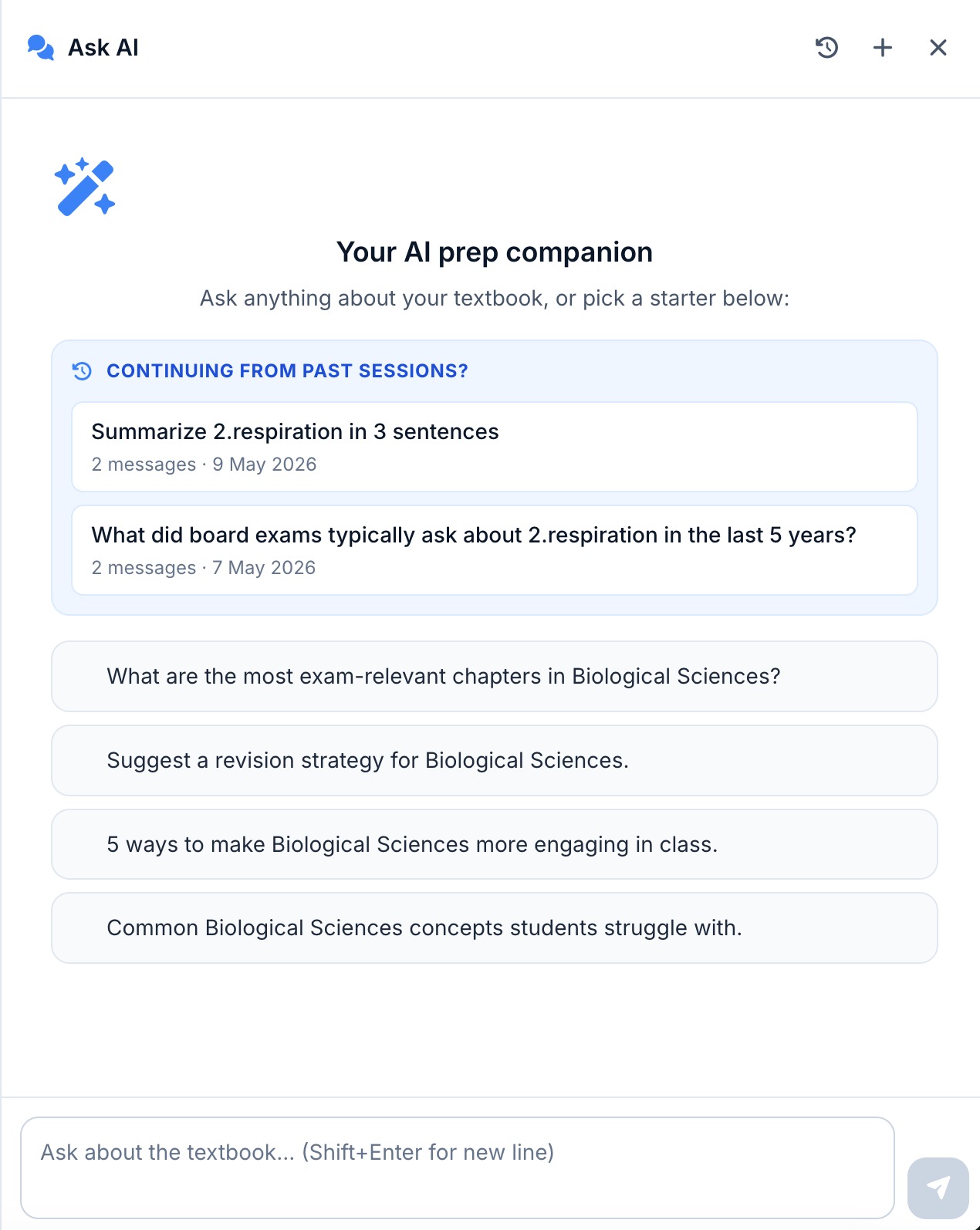
The starter screen adapts to the active subject and surfaces four ready-to-use prompts โ€” exam-relevant chapters, revision strategy, engaging examples, common struggles โ€” so neither students nor teachers face a blank input. Past sessions reappear at the top of the panel, so a half-finished MCQ practice or revision strategy picks up exactly where it was left.

Ask AI starter screen โ€” AI prep companion with continuing sessions and subject-aware starter prompts for Biological Sciences
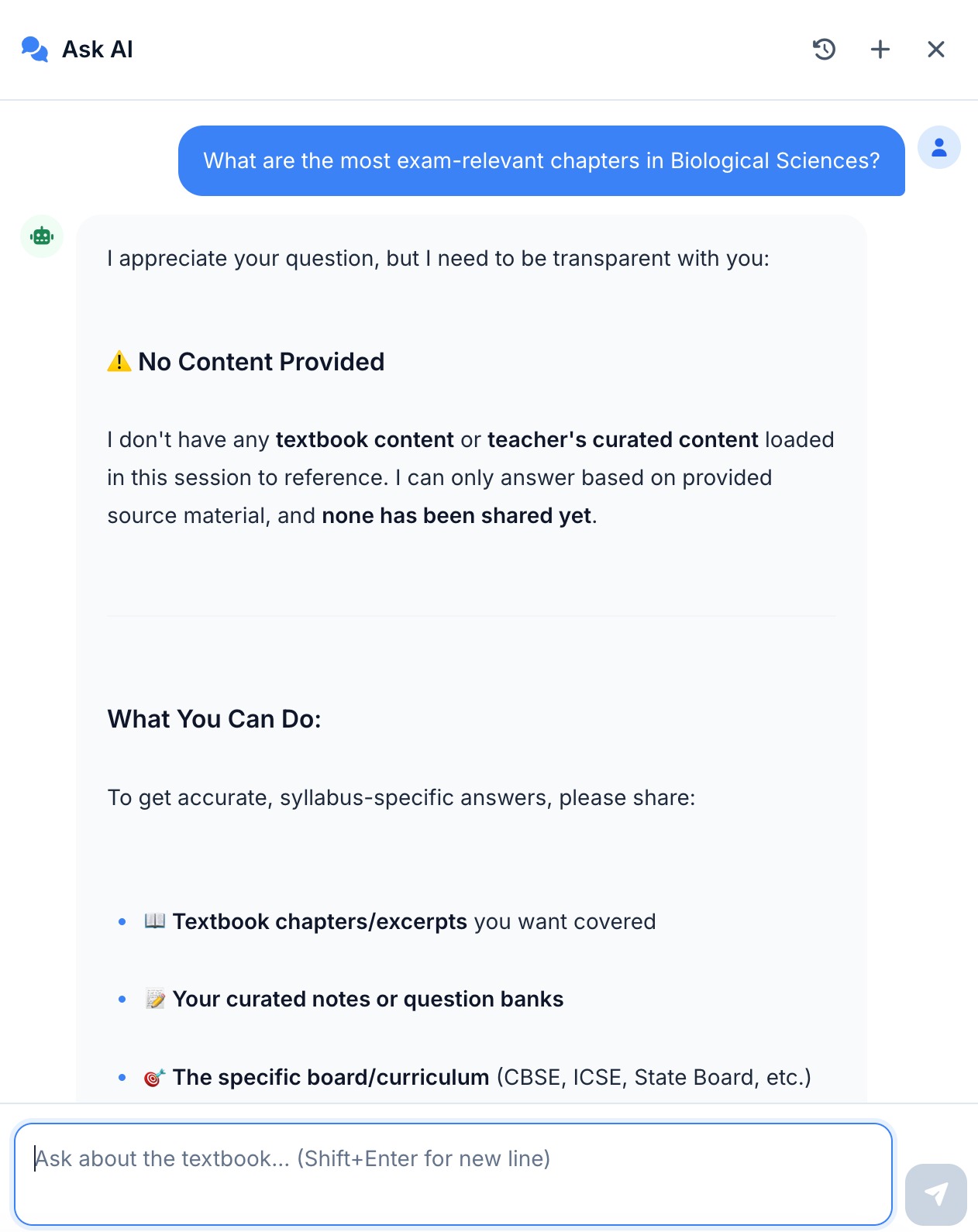
Graceful refusal โ€” 'No Content Provided' response when no textbook material is loaded, prompting the user to share source material
No hallucination

When it doesn't know, it says so.

Generic chatbots invent a textbook reference rather than admit a gap. Textbook Chat does the opposite โ€” when no indexed material clears the retrieval-confidence threshold, it refuses to answer and tells the student exactly why.

The refusal isn't a dead end. The response calls out what's missing (textbook chapters, curated notes, the specific board or curriculum) and asks the student to share it โ€” turning a "no" into a clear next step. Every honest "I don't have this" is what makes the citations on every other answer worth trusting.

Export ยท Reuse

Take any answer with you.

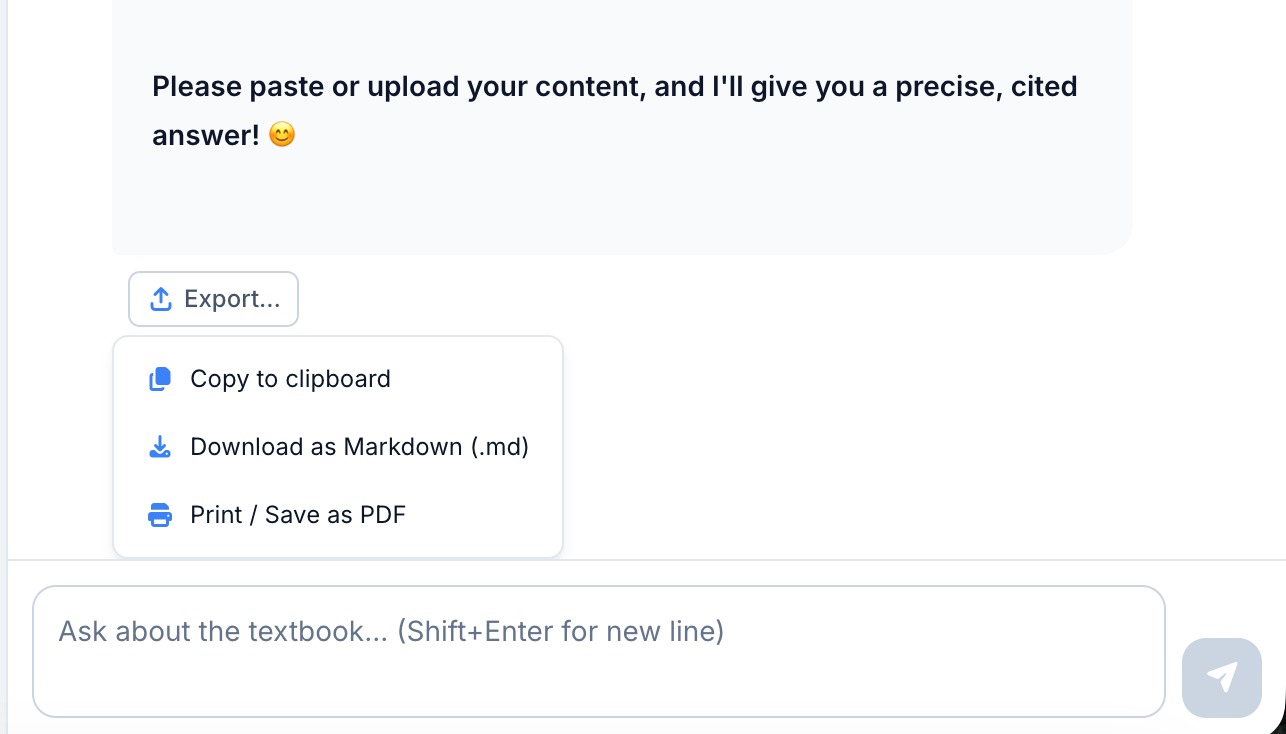
An answer trapped inside a chat panel isn't useful for revision night. Every Textbook Chat response carries an Export menu with three formats โ€” each tuned for a different downstream use, with citations preserved in all of them.

Copy to clipboard for a quick paste into class notes or a WhatsApp share. Download as Markdown (.md) for editing in any notes app โ€” Obsidian, Notion, plain text. Print / Save as PDF for handouts, parent shares, and revision packs. Chapter, page, and paragraph footnotes travel with the export, so students can verify the source on paper just as easily as on screen.

Export menu โ€” copy to clipboard, download as Markdown, or print / save as PDF
Frequently asked

Textbook chat questions teachers ask first.

What does the chat do when the question isn't covered in the indexed content?
It says so. The assistant is configured to refuse rather than guess โ€” if no chunk above the retrieval-confidence threshold matches, the response is "I don't have this in the indexed material for this class" with a suggestion to widen the scope (other chapters) or ask the teacher. This is the opposite of a generic LLM, which would still produce a plausible-sounding answer.
Do teachers and students see the same answers?
Same retrieval engine, different response shape. Teacher mode answers fully, exposes the indexed source paragraph, and surfaces lesson-plan integration. Student mode is age-appropriate, can be set to gentle-hints rather than direct-answers (per class), and respects per-class restrictions โ€” for example, a teacher can lock chat to the current chapter during exam week or disable it entirely.
What exactly gets indexed for each chapter?
The textbook PDF is required and acts as the primary source. Optional additional materials (notes, handouts, references) and an optional workbook (practice problems) are layered on top. Content is chunked at around 2,000 characters, embedded into 1,536-dimensional vectors using Azure OpenAI's text-embedding-3-small, and stored as VECTOR(1536) per tenant. Diagrams are indexed separately so the chat can surface them as visual aids.
Can I export an answer or the whole chat?
Yes โ€” every answer has an Export menu with three options: copy to clipboard for a quick paste into notes, download the full thread as Markdown (.md) for editing offline, or print / save as PDF for handouts and revision packs. Citations travel with the export, so the source chapter, page, and paragraph stay attached to each claim.
Is chat history visible to teachers, parents, or admins?
Per-student transcripts are visible to the assigned class teacher and to school admins on the tutor dashboard, which is how common-doubt analytics work. Parents see their own child's transcripts in the parent app. Students see their own. Transcripts are never visible across tenants and never leave your region โ€” India or GCC-resident, on your choice of AWS, Google Cloud, Azure, or private cloud.
How fresh is the answer when the chapter content is updated?
Re-indexing is on-demand and incremental โ€” replace a chapter PDF and only that chapter's chunks are re-embedded; everything else stays untouched. The chat picks up the new content on the next query. There's a chapter-index management screen that shows uploaded files, chunk counts, and last-indexed timestamps so admins can audit what the assistant is drawing from.