Home
Products ๐Ÿค–
Skora AI AI Grading
โœจ
Teach Smart AI Co-teacher on your books
๐ŸŽ“
Education ERP School & college platform
๐Ÿ‘ฅ
HRMS & Payroll People ยท payroll ยท compliance
Partners Pricing Blog Demo Contact
Talk to sales Book a demo
02 โ€” Worksheets & Tests

From a chapter to a printable worksheet โ€” in 5 minutes.

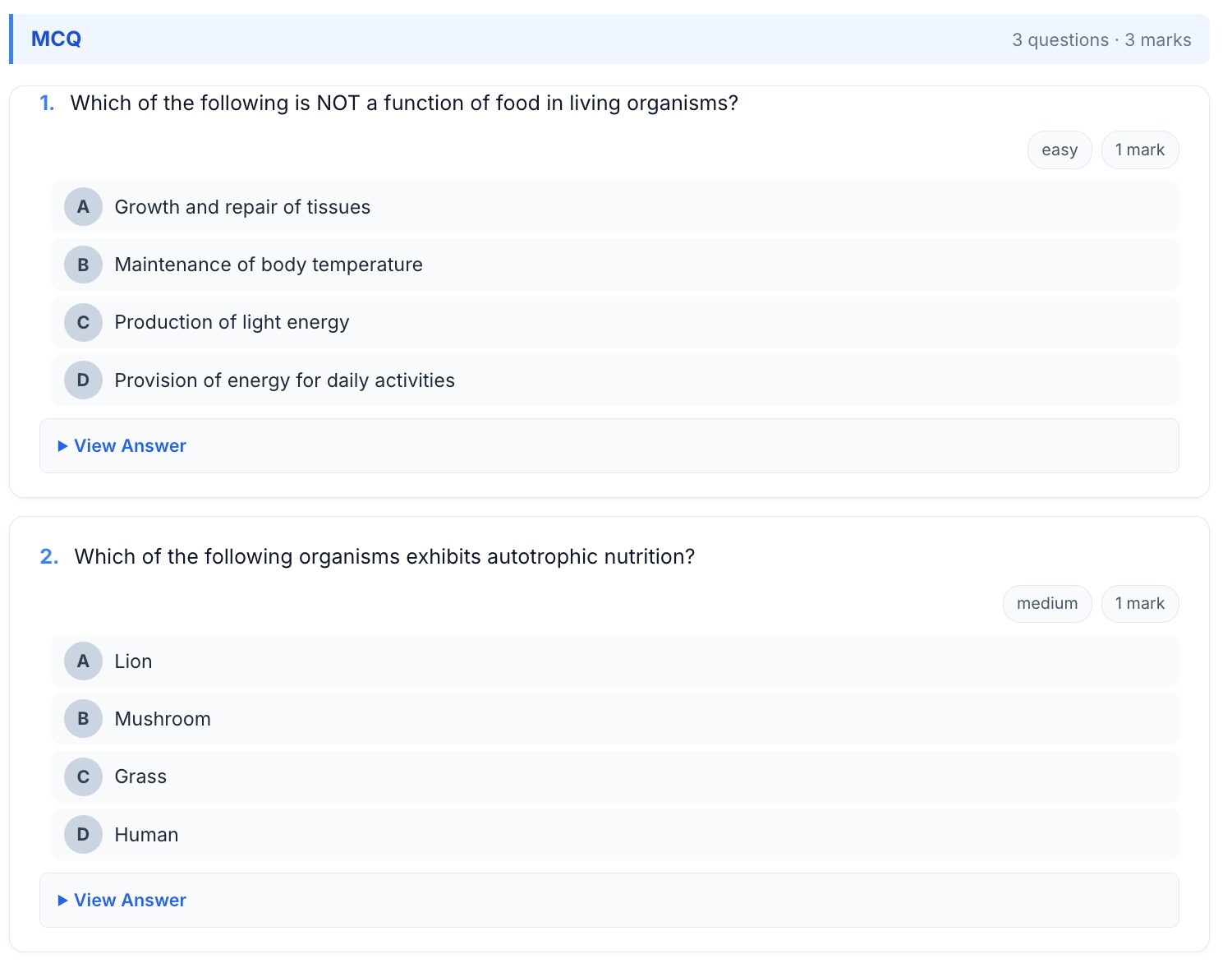
Generate question papers and worksheets with mixed question types, difficulty levels, marks distribution, and answer keys โ€” grounded in your textbook, linked back to Skora AI.

Worksheet generator screen โ€” chapter picker, question type selectors, difficulty mix, marks split
Rubric ยท Grading criteria

What "good" looks like โ€” before Skora AI grades it.

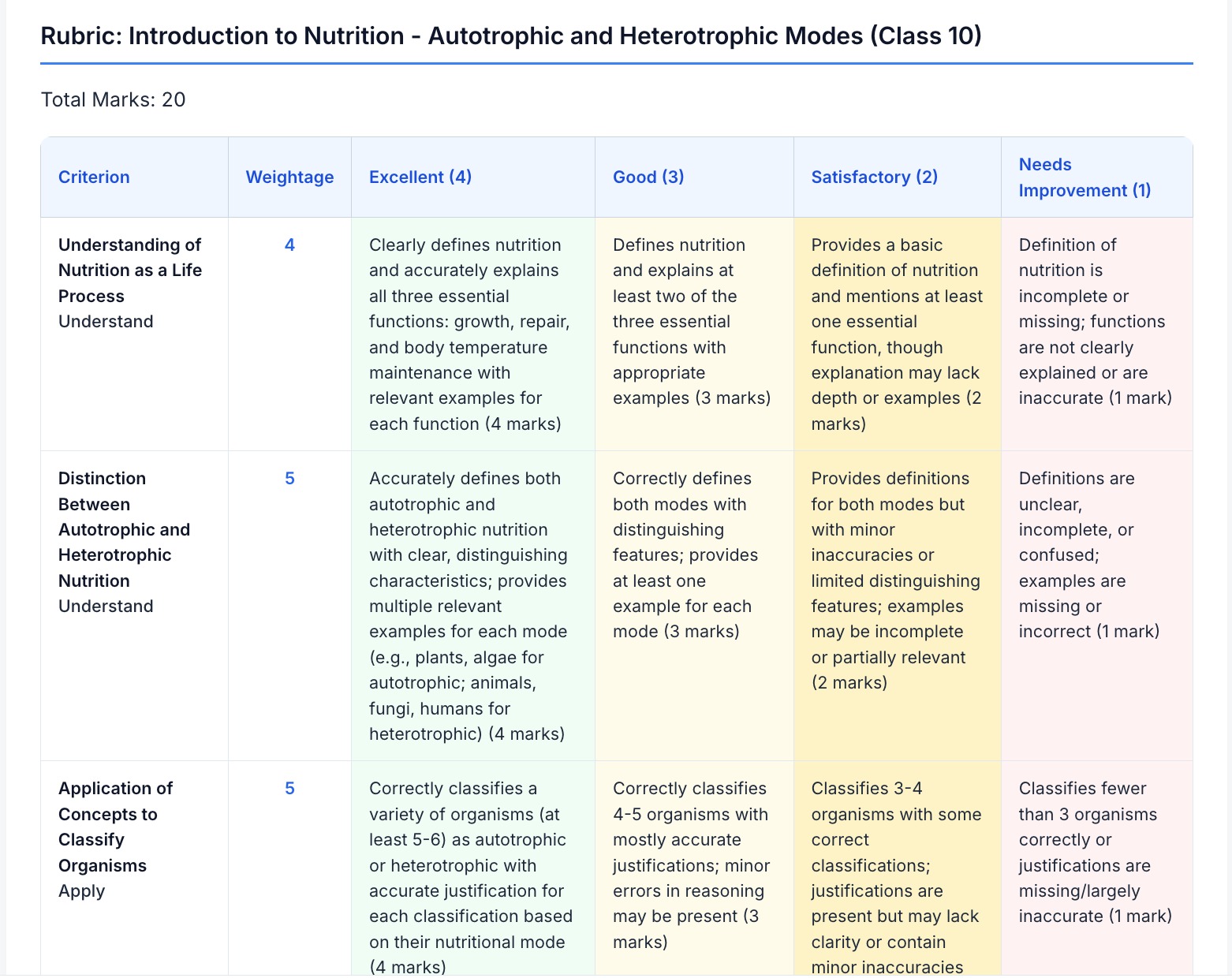
For long-answer, essay, and project work, the rubric defines performance levels per criterion. Teachers calibrate once; Skora AI applies it consistently across the whole class.

  • Criteria broken down per learning objective from the lesson plan
  • Four or five performance levels with explicit, classroom-tested descriptors
  • Mark allocation per criterion, totalling the question max
  • Editable inline before assessment goes live
  • Skora AI grades against the same rubric โ€” no calibration drift between teachers
Rubric editor with criteria rows, performance level columns, and mark allocation
Frequently asked

Worksheet questions teachers ask first.

How do I control the marks split, difficulty mix, and question types?
A blueprint panel lets you set the total marks, the split across sections, the question-type mix (MCQ / VSA / SA / LA / Match / Numerical / Diagram-based), the difficulty distribution (easy / medium / hard), and the Bloom's-taxonomy spread. Teach Smart generates against the blueprint and warns you if a chapter doesn't have enough indexed content to honour the requested mix.
Are MCQ distractors really plausible or are they obvious wrong answers?
Distractors are generated from the indexed chapter content and from common misconceptions catalogued for that topic โ€” not random text. The validator filters distractors that are factually true (which would make the question ambiguous) or trivially distinguishable. A "re-mix distractors" action regenerates just the wrong options if a teacher isn't satisfied, without touching the stem or correct answer.
What does "the worksheet auto-registers as an exam" actually mean?
When you publish a worksheet to a class on the Digiclove Education ERP, it creates the matching exam schedule row, attaches the answer key, and pre-fills the Skora AI paper structure โ€” so once you scan back the answer sheets, grading starts without any re-entry of questions or keys. This is what closes the Teach Smart โ†’ print โ†’ scan โ†’ Skora AI loop on a single tenant.
Can I generate a parallel version of the same worksheet for a re-test?
Yes โ€” the "Re-mix" action keeps your blueprint (marks, types, difficulty, Bloom mix) and chapter scope identical but generates fresh questions, fresh distractors, and a fresh answer key. Useful for a make-up exam, a section-B version, or simply a different paper for different sections of the same class. Each version is versioned and kept in the worksheet library.
What formats can I export to for printing or sharing?
The worksheet is rendered as a print-ready layout in the browser โ€” print directly to PDF (every browser ships this) or to a physical printer. The answer key is generated alongside the worksheet as a separate printable view, so teachers can hand out one and keep the other. Schools running the parent app and student app can also push the worksheet (without the key) straight to students, with submission tracked back into the ERP.

Send a chapter. Get a worksheet back.

Tell us the marks split and difficulty mix you want. We'll index your chapter and generate a printable worksheet โ€” free.

Try it free Back to overview